Looking for a fresh point of view?

I feel that polarisation seems to be at the heart of many human interactions these days.

I feel that we are split. Find those who agree with us, and try to avoid those who disagree with us. But I think we should do the opposite. To hang around with those who agree with us, is just to live in a feedback loop and we learn nothing new.

Rather than follow the newspapers that reinforce our beliefs, or follow the photographers that tell us what we already believe, we should go out there to find an alternative view. Even one we may disagree with. Because it will challenge us.

Fjallabak-Sept-2018-(2).jpg

If you know yourself enough, you are most probably comfortable hearing another point of view without feeling threatened. To be able to filter between your own beliefs and someone else’s and to find a new position is the kind of openness we all need as artists.

I don’t for one minute expect everyone to agree with my blog writings. My blog is just a point of view. That’s all it is. But is it challenging enough for you?.

Often hearing things we don’t want to hear, can feel unpleasant, or may feel of little benefit at the time. But if you’re as old as I am (52), then you’ve perhaps learned that challenges and trials in life are often times of growth. We don’t see them that way at the moment they happen, but often years later we’re able to look back and say ‘I learned something’.

I really don’t wish to live in a world where things are predictable and stay the same. And I realise I’m entitled to change my mind as time goes on, because I learn. And I change. We all do.

I think comments or views that are considered negative at the time, are views we should sit up and listen to. I don’t mean to suggest they’re always right, but if they challenge our point of view, then it means we have been given a chance to grow. We’re either able to get more clarity on our current position, or to discover that we’ve learned something and our position has changed as a result.

For me, I’d prefer to go and seek someone who tells me something I’ve never heard before. I’d like to believe I’m strong enough to not feel threatened, while at the same time be able to re-consider without being brainwashed - to find my own new position.

Which brings me to my point today:

  1. as much as I believe I am right, there is always room for another way of seeing things.

  2. I’m entitled to change my mind, at any point.

  3. I’m entitled to change my art, at any point.

  4. Everything is up for discussion. Even when the work is complete.

  5. The work is never complete.

The work is never complete. Nothing is ever cast in stone, and nothing is ever black and white. We should seek fluidity in what we do. We should allow things to happen regardless of our views. We need to be open to let creativity flow.
Re-imagining your exposures

This article relates to RAW conversion, and also film scanning. Although I may refer to film scanning most of the time, you should take into consideration that this applies to RAW conversion also. It’s just that I’m a film shooter, but the concepts still apply if you are a digital shooter.

RAW conversion is important because it is the foundation which all your subsequent edits are built upon. If you start with an image that has too much contrast in it, then you’ll be fighting a losing battle in trying to make some parts of the scene calmer later on in the edit.

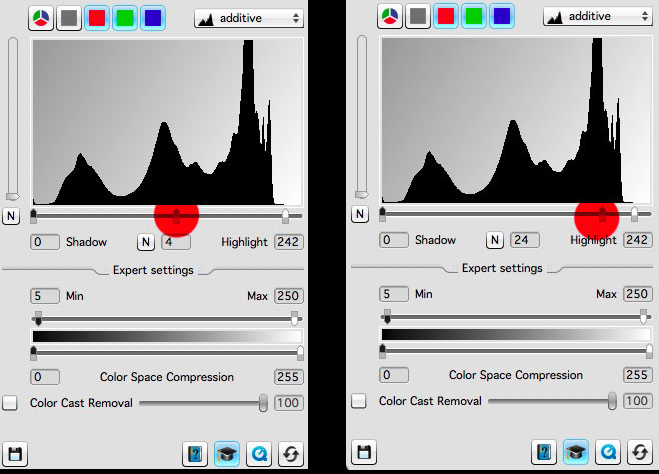
In my scanner software, I’ve chosen to move the mid tone slider to the far right. I get much brighter, and softer scans from this. It’s a really great setting for snow or bright scenes and it keeps the tonal graduations smooth and soft.Setting expos…

In my scanner software, I’ve chosen to move the mid tone slider to the far right. I get much brighter, and softer scans from this. It’s a really great setting for snow or bright scenes and it keeps the tonal graduations smooth and soft.

Setting exposure in a film scanner is an art. You need to learn to use the exposure control to give you the file you want.

My theory and working practice is to try to keep the RAW file as soft and flat as possible. If you start with a soft file, you can always add contrast to local areas of the scene later on. But it’s often impossible to do it the other way round. Start with a contrasty file and try to reduce the contrast in certain areas often has unbelievable and displeasing results.

If I were a digital shooter I would use the black and white sliders sparingly. I would also adopt a view that RAW conversion is not about “pumping up the file to get an all-in-one punchy look”. That’s a dangerous road to go down, and unfortunately, it’s the road that many take.

“RAW conversion should be about setting a minimal baseline from which to work with. But it should be also just as importantly about maintaining the smoothest, softest tones you can keep in your file. By cranking up the blacks and whites in the conversion or applying some camera profile such as ‘vivid’ or ‘landscape you are just going to make the tones within the image much more contrasty and 'hard' looking. All those beautiful soft tones will be obliterated in a couple of clicks.

The same is true for film scanning. When I scan, I never use the auto-exposure feature because it’s assumption is that the file will look much better if the blacks and whites are clipped by a percentage and the tonal range is compressed to look punchy. I’m sure the assumption by ‘Auto-Exposure’ is to try to get the file looking strong as soon as possible. But it’s a clumsy way to work.

Once it’s baked in, it’s baked in. Working with a badly exposed film scan won’t get me anywhere.

“I am often trying to keep the contrasts low and sometimes the mid point of the levels command is pushed to the far right to brighten up the exposure while maintaining low contrast.

In summary, going for the “let’s get the image looking close to where we want” approach at the beginning of RAW conversion is , in my view, bad practice. There is nowhere to go after you do this. The cake is baked before you got the chance to do anything with it.

“Your approach should be for local contrast adjustment. By applying contrast selectively to areas of the image you maintain smooth tones while introducing the perception of punch in the image.

You need to have latitude in your file to leave areas of it soft and be able to punch up the contrast where you feel it’s needed. Applying global contrast in one swoop may feel like you’ve got to where you need to go, but you do so at the cost of sabotaging areas of the picture that need a more delicate approach.

It’s just plain clumsy, a bit like the spray-and-pray attitude of firing the shutter and hoping that one image will be a good keeper. Image editing is a skill. It’s an art. It’s just as important as image composition out in the field, and an area that with the wrong approach can kill fine images.

New e-Book Printing Masterclass

For those of you who do not follow my monthly newsletter, a few days ago I published a new e-book about printing.

If you’ve been following my blog for some time, you will know that I don’t believe that images are truly finished until they have been printed well. In other words, printing is the final verification stage that you can do. A well calibrated and profiled monitor can only take you so far. As the American photographer Charlie Cramer says ‘ If it looks good on a monitor, there’s no guarantee it will look good in print, but if it looks good in print, it will look good on a monitor’. So we should all be printing.

Maximum white pixel count problem

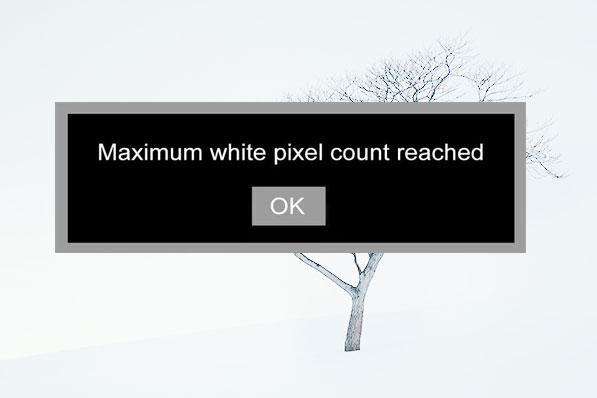
If you keep using the same camera for more than 4 or 5 years in snowy locations, you’ll eventually encounter the dreaded “maximum white pixel count reached” message. Once you reach this point, your camera will no longer be able to record snow any more.

white-pixel-death.jpg

It’s the error message that all keen winter shooters should dread, because it signifies that the camera has been subjected to an unhealthy amount of RGB 255,255,255 scenes that all the white pixels have been used up.

That means no more Lofoten. No more Iceland, and no more Hokkaido.

It also means no more lone-tree-snow scenes.

As you can imagine, this last point personally caused me a great deal of panic.

There are so many hapless photographers out there using a camera that is effectively a time-bomb. With each actuation, with each shutter press fired in a snow scene, they are slowly marching their camera towards a snowy demise.

A hapless bunch of photographers. Unknowingly, their cameras, all heading towards a snowy demise.

A hapless bunch of photographers. Unknowingly, their cameras, all heading towards a snowy demise.

It’s certainly been a costly exercise for me. After each winter has passed, my digital cameras are often ready for the bin. That is, until recently.

There is a solution

To avoid your camera ever reaching white-pixel burn out, some photographers are advising to turn the exposure compensation to minus one (-1).

The reasoning is that this will ensure that your camera never uses any white pixels. At all. Which is great because you’ll completely avoid the possibility of ever running out of them.

The downside is that your pictures may suffer from being slightly dull. If you feel your images look a little dark after using this solution, I’ve found that turning the brightness dial of my monitor clockwise by a third can help a lot. More than you can imagine.

Parting thought

White-pixel-death is going to become a bigger problem in the years to come. As winter photography rises in popularity, camera manufacturers are going to have to think long and hard as to whether it may be worth setting the exposure compensation to minus one as a factory default.

I’ve even heard some rumours that some cameras may be released as special snow-editions. These models are essentially packed with twice as many white pixels as the standard models.

It’s early days yet, but it seems there may be a solution to keeping me happy shooting my lone-trees and white snow scenes for many years to come. Until a permanent solution is found, I’d advise we all just continue to work with exposure compensation set to minus one, and if that isn’t possible, shoot any snow scenes at night time when it’s dark.

Printing's role as the final stage in image verification

Back in the days when I didn’t print, and asked a pro lab to do it for me, I always had a nagging feeling that I’d lost control of my baby.

I’m a self-confessed control freak when it comes to what I do. A few days ago I wrote a blog post about appetite because I think I know appetite well: whatever I get into, I never seem to get into it in half measures.

Screenshot+2019-03-17+at+09.53.56.jpg

Knowing this about me, you may be surprised to find out that at the beginning of my photographic journey, I often got my images printed by a lab. Indeed, I only started printing about 10 years ago.

For a long time I shied away from tackling what seemed like a formidable mountain because colour management was like a black art to me.

So I stayed away.

I’ve been extremely fortunate to have this blog. It has allowed me to meet people who have helped me and I put out a request about a decade ago for some help and suggestions about printing. Not one person left an entry on the blog, but instead chose to email me privately about it. The emails usually had this format to them:

“I don’t want to get flamed for my opinion, but this is how I do printing”.

It seemed that printing was a religion and to say you had a different way of doing it to someone else’s way was often contentious. A point of view is just that, and yet I am often surprised that we feel threatened when someone has a different view from ourselves.

Well, I welcomed the input but the message I got from the replies was this: everyone has their own way of working.

I doubt things have changed much in that regard over the past decade. There is still a lot of ways you can slice an onion, and there is always going to be a huge amount of fact vs personal preference.

So it’s now a decade further on, and I feel I know a thing or two about printing now. Indeed, I feel that everyone who loves photography should print. For one very simple reason: to validate your edits.

Even with a well calibrated and profiled computer monitor, I have learned that I cannot 100% trust it. I think it has something to do with how the eye interprets transmitted light compared to reflected light.

The fact is: I often notice areas that need further work when I study a printed version of an image. Stranger still, I often find that once I notice the error on the print, I can now see it on the monitor also. But the opposite is not true.

So printing is your last verification stage, and to paraphrase the wonderful Charlie Cramer :

“images that look good on a computer monitor aren’t guaranteed to look good in print,
but good prints are guaranteed to look good on a computer monitor”

Well, the issue for most who don’t print is: how to get started? It seems like such a black art. Yes, it is difficult to get started. There is so much contradictory advice out there. There is no one single way to do this correctly (even if I think my process is good).

I think this is why I’ve chosen to attempt to write an ebook about it. If I can reduce the information down to what you need, rather than getting too lost in the technology, then maybe I might be able to help you get a head start with this. I’ll see how it goes, but so far I’m feeling good about how much I’ve written. I think it’s coming together really well.

On buying new equipment

I’m a gear head. Let’s face it, we all are. Aren’t we?

I just don’t like to write about it much, because there’s already too much of that kind of thing out there. Buying gear, and focussing on gear is much easier to do than actually working on improving our craft. And if we’re time-poor (which most of us are) then buying gear is an easy way of satisfying our desire to be out there making pictures.

I haven’t tired Lee’s new filter holder yet. And as much as I’m a self-professed gear head, I’m going to withhold from getting one.

No slight intended on Lee, or their filter holder. I’m sure it’s a wonderful product as I think original holder was a well made piece of kit.

It’s just that my current working process is working. Hence why I called it a working process. I don’t need to change it right now.

And this is my reason for writing today. If you have a process that’s working fine, then try not to mess with it too much. Ok, I appreciate that staying stuck in the mud for too long isn’t good either and it’s always worthwhile trying out new things. But I think there’s already too much of that. It’s so easy to get new things, and it’s so easy to change a working process without really understanding how it’s going to impact you.

I’m sure I’ll eventually try out the new Lee filter holder. But I’ll do that when my current holder gives out. But so far, over the past two decades, they’ve been pretty darn good and I’ve never had much complaint about them. I always felt that the Lee holder was one of the best holders out there.

Perhaps the new holder is better though. Well sure, that might be so, but I’m unwilling to go through the hassle of getting familiar with it. So often I’ve adopted a new piece of kit only to discover growing pains in getting used to it. For example, I once dropped a camera into a river because I wasn’t familiar with the clamp on a new ball head I had just got.

My process is pretty good right now. It works very well and I feel that all my equipment is like a comfortable glove. It doesn’t get in the way and I’m able to get on and do what matters : make images.

Appetite

So a few days ago I wrote about appetite.

I deliberately left it open and didn’t continue to expand on what I meant. My reasons were two:

  1. that I think if you’ve got it, you would know what I meant.

  2. and if you didn’t know what I meant, you might be prompted into thinking a bit more about it.

The web is full of self-help stuff. Most of it has a short-term feel-good factor but it’s rare that things we read stay with us the long term.

we’ve got to do the work. And we’ve got to be clever about it.

Me explaining things all the time isn’t you doing the work. It’s me doing the work, and you choosing to tune in, and tune out when you feel like it ;-)

Fjallabak-(6).jpg

The thing about appetite, is that it can be whatever you feel it means to you.

You may define it as ‘drive’, you may define it as ‘effort’, or ‘talent’.

But I’ve known many talented people who never complete things (that’s ok - it’s no judgement - do what you want to do), but I mention this just to illustrate that having talent alone doesn’t make someone a great photographer. Neither does working hard. I’m not a big fan of the 10,000 hour view that if you put enough time into something, you’ll get better. You can spend a lot of effort running in a circle.

I think good artists are self learners. They are able to use their time to learn from themselves as they go along. I’d dare to say that most great artists didn’t get to where they are because of an art class they took. Sure, the art class will have given them skills and new ways of working, but they had to spend the time and effort joining the dots, making the connections and finding their own path. In other words, at some stage : they took hold of the responsibilities of their own development.

That’s the appetite I’m talking about.

Having the aptitude to grow is one thing, but wanting to do it badly enough is another thing entirely.

If you really want to improve in your photography then there are no shortcuts. No quick fixes, no instant results.

We all have to do the work.

And we have to have the appetite to do it.

The rarest quality

Everyone is hoping to improve their photography skills. Skills can always be learnt.

But there is one thing that is much rarer than skill, and it’s something that can’t be learnt.

It’s called appetite.

Hokkaido-2019 (10).jpg


Colour compression & colour spaces

I’ve been working on some notes about printing lately. So this post today is all about colourspaces and what happens when we move an image from one colour space to another.

In the article I point out that colour management is not about colour accuracy, but more about how we choose to work around physical limitations as we move from one device to another, each with different colour gamuts.

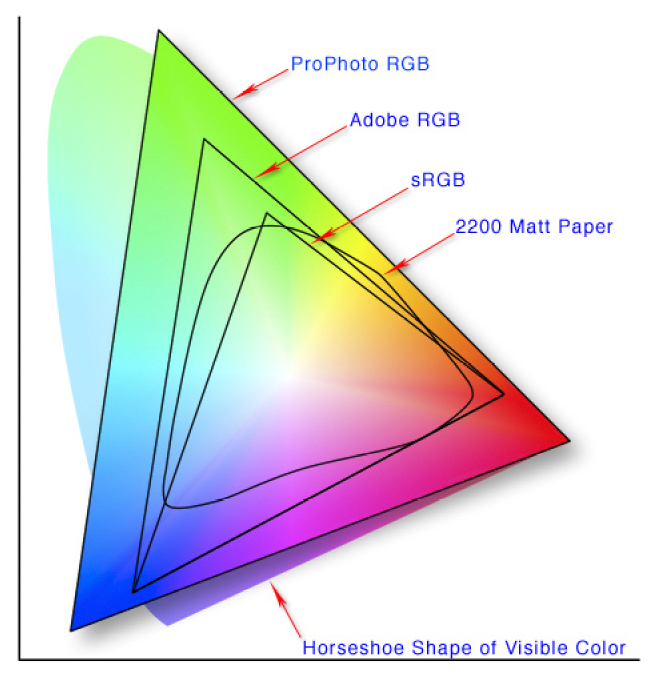
2200 Matt paper has a small colour gamut, than Pro Photo RGB. So what can we do to make our image look good on 2200 Matt Paper even though it is physically impossible to do a direct conversion?

2200 Matt paper has a small colour gamut, than Pro Photo RGB. So what can we do to make our image look good on 2200 Matt Paper even though it is physically impossible to do a direct conversion?

The problem

Each device has its own physical limits to the range of colours it can record or reproduce. This is the problem: what do we do as we move an image from one device to another?

For example, when sending a file with a wide gamut of colours to a monitor or printer with a smaller gamut of colours, something has to be done with the colours that fall outside the physical range of the device’s effective gamut. Do we ignore those colours, or should we do something else with them?

The solution : Rendering Intent

The answer is : we decide, and we tell the colour management system our decision by way of a feature called Rendering Intent. Rendering Intent is where we tell the colour management system which rules to apply with respect to out of gamut colours.

There are several different rendering intents available. The two most commonly used rendering intents are Perceptual and Relative Colourmetric, which kind of do this:

Perceptual : shrink all the colours from the larger colourspace to fit the destination colourspace.

Relative Colourmetric : out of gamut colours are clipped, moved to their nearest relative within the new colourspace. All the other colours remain unchanged.

That’s a brief summary. Let’s consider them in more detail:

Perceptual

This rendering intent as the name suggests tries to adjust the content of the image so you perceive it as similar to the original image even though the colourspace is smaller. It does this by adjusting all the colours while keeping their relationship to each other intact. Although it is not ‘colour accurate’, most photographs look about right when it’s chosen as more often than not, it’s the relationships between the colours in the picture rather than their colour accuracy that is important. Here is an illustration to show how all the colours are shifted to fit the new colourspace:

Rendering-Intent-Perceptual.jpg

The other most common way of working around out of gamut colours is to choose relative colourmetric:

Relative Colourmetric

This rendering intent keeps all the colours that were within gamut unchanged. It’s a useful rendering intent when you want to ensure colour accuracy for certain colours - perhaps skin tones for example. Only the colours outside the gamut are clipped. They are moved to their nearest available in-gamut colour relative. As you can see below:

Rendering-Intent-Relative-Colourmetric.jpg

As you may now realise, colour reproduction is a compromise. And colours often have to get compressed if we are moving from a device with a wide gamut to a device with a smaller gamut.

We have to make the decision about which rendering intent to use. And the best way to choose the right one, is to demo them. If you are printing, then under the proofing preview, you can move between the different rendering intents to see how the colours are changed. Choose the rendering intent that suits your image the best.

No right or wrong way

Rendering Intent is best auditioned on a per image basis. Further, although an image may suit one rendering intent when printed on paper X, you may find that the same image prefers another rendering intent when printed on paper Y.

So you need to experiment on a per image basis.

But what about monitors? Do we have to compromise with them also?

As it happens, yes. Standard monitors have their own colour spaces (profiles), and when viewing something that comes from a larger colourspace on the monitor, a compromise has to be made.

Monitor Profile Rendering Intent

From what I understand, Monitor profiles are matrix based and this means that they have no idea how to deal with out of gamut colours. So they are simply clipped. In other words, when displaying out of gamut colours on a monitor, the monitor is essentially using a rendering intent of ‘Relative colourmetric’ (as illustrated above). We don’t have a choice about rendering intent when displaying an image on a monitor. It’s always ‘relative-colourmetric’.

In the diagram below, I have a Pro Photo colourspace image open in Photoshop, but I am viewing it on a monitor that has a smaller colourspace than Pro Photo. The colour management system responsible for the conversion from the image profile simply displays the colours unchanged, and any colour that it can’t display is just clipped to its nearest relative within the monitor colourspace.

monitor-profile-rendering-intent.jpg

In summary

  • Colour management is not the same thing as colour accuracy.

  • To manage colours, we need to have profiles that describe the colour gamut of each device, but we also have to make decisions on how to deal with colours that fall outside the gamut of a particular device. This is called the rendering intent.

  • We can choose which rendering intent to use when printing.

  • But we have no control over how out-of-gamut colours are displayed on computer monitors, they are just clipped to fit the nearest colour within the destination colour space.

Cameras and Colourspace Confusion

A lot of photographers think that the colour space option of ‘sRGB’ or ‘Adobe RGB’ on the back of their camera is used to set the colourspace of their camera.

It doesn’t do that.

The colourspace settings are only for the jpegs that are produced in-camera.

RAW-Conversion.jpg

RAW data is unaffected. Indeed, RAW can’t be modified. Think of RAW as a 'negative’ that comes out of an old film camera. The negative can never be changed once created.

So the ‘Adobe RGB and sRGB’ settings on the back of your camera are just for any jpegs that the camera ‘generates’ from the RAW capture .

If you are shooting RAW all the time, then you don’t need to worry about colourspaces while shooting.

Q. So when is the colourspace important then?

A. When you open your RAW files

When you open (or import), you are translating, converting the content of your RAW file into the host software’s format. In Photoshop’s case, you always go through the Adobe Camera Raw software before the image is available in Photoshop. It has to go through this translation stage.

The Raw Converter is where you can set the colourspace and it’s really important to pick a colourspace large enough to contain all the data that your RAW file has.

Effectively speaking, RAW files have no colourspace that you know of. Well, it’s a bit more complicated than that, but when you open up in Photoshop, you have to go through the Adobe Raw Converter. This is where you choose the colourspace and the RA…

Effectively speaking, RAW files have no colourspace that you know of. Well, it’s a bit more complicated than that, but when you open up in Photoshop, you have to go through the Adobe Raw Converter. This is where you choose the colourspace and the RAW file is translated to that colourspace.

Pro Photo is the colourspace to choose, because it is a large enough container - much larger than Adobe RGB, and most likely much larger than any colours your camera can record.

A not too accurate illustration to show that Pro Photo is a larger colourspace than Adobe RGB. You should open your RAW files in Pro Photo.

A not too accurate illustration to show that Pro Photo is a larger colourspace than Adobe RGB. You should open your RAW files in Pro Photo.

If you choose Adobe RGB you may be clipping (throwing away) some of the colours that your camera can reproduce, because your camera may be capable of recording colours outside of the Adobe RGB colourspace.

The best option is to open up your camera files in Pro Photo. It’s a larger colour space and won’t clip the data. You’ll keep all of the colours in your file.

Q. But doesn’t the RAW format have it’s own colourspace?

A. Technically speaking there is a lot of splitting hairs about this. Some say no, some say yes.

The camera has its own proprietary way of recording the data, and this ‘specification’ is given to the developers who write the RAW converter engine. It’s up to them how they translate the information and this is why RAW converters vary (please note this is a serious oversimplification here).

Q. Why keep all the colours if your monitor or printer uses a smaller colour space?

A. Because the more data you have while editing, the better

Your camera is a glorified computer that just stores numbers. Photoshop just reads numbers, and when you alter a photograph you are truncating those numbers. It follows then, that the more data you have, the less chance you have in introducing weird problems into the file when you edit or adjust it in any way.

Although you cannot see all the colours present in Pro Photo because your monitor maybe has a smaller effective gamut, you still get the benefit of having more data to play with while editing.

In summary

  • The colourspace settings on the back of your camera are just for the jpegs it ‘generates’ from the RAW files.

  • The RAW files are unaffected and can’t be changed.

  • When you import a RAW file into a photo editing program, it has to get ‘converted’ or translated. This is when you need to choose a colourspace

  • Choose a large colourspace otherwise you may truncate colour data